
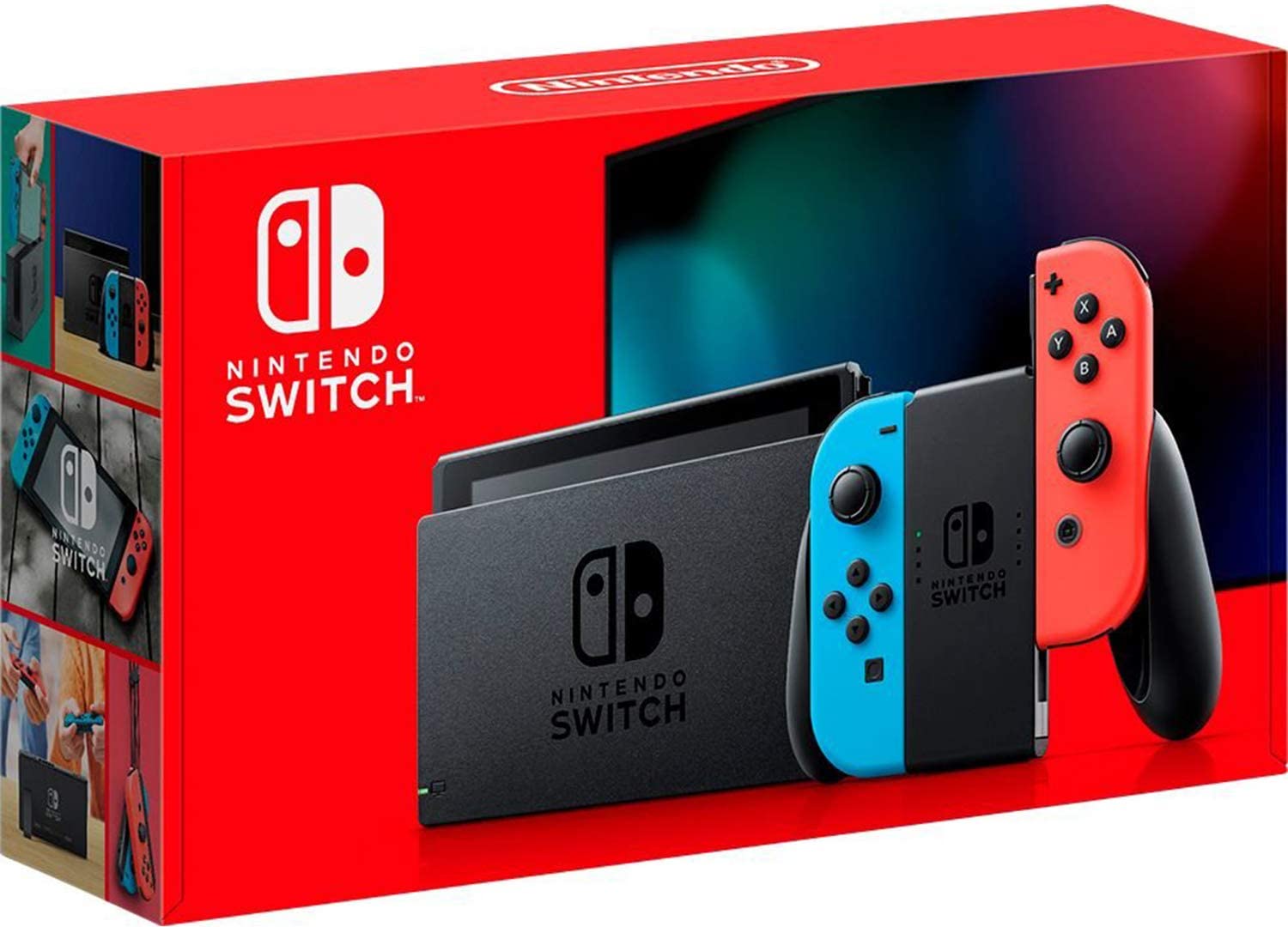
Nintendo Switch was released in 2017; as its name suggests, it is a portable home video game console developed by Nintendo. This article summarizes basic information about the Nintendo Switch and how to use it. It also explains the battery life, which is a concern when taking the device outside. Check it out if you are planning to buy the device!
"Nintendo Switch Online" is a paid service that allows you to play online on the Nintendo Switch and use dedicated smartphone applications. The service will be officially launched on September 19, 2018.
Source: www.nintendo.co.jp
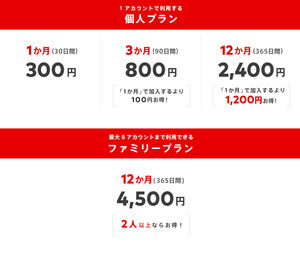
Rate plan
● Individual fee plan
1 month (30 days) 300 yen
3 months (90 days) 800 yen
12 months (365 days) 2400 yen
● Family Plan
12 months (365 days) 4500 yen
* All prices are tax inclusive.
Source: www.nintendo.co.jp
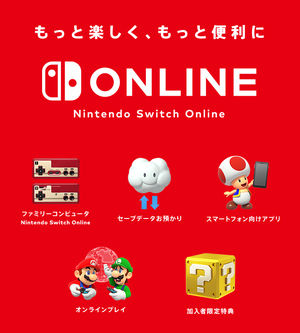
5 Services
- Online Play
With software such as Splatoon 2 that supports online play, you can play against friends who are far away or play together.
- Family Computers
Nintendo Switch exclusive software full of various family computer games.
● Receiving saved data
Save data of supported software is automatically received via the Internet and stored with care.
● Apps for smartphones
You can use a special application that allows you to play voice chat easily online.
● Benefits limited to subscribers
We plan to offer a variety of services, including exclusive products and promotions for subscribers, and special data distribution.
Method of participation
Source: www.nintendo.co.jp
● Nintendo Switch Nintendo e-shop
Available from the Nintendo Switch Online menu on the left.
● Nintendo Website
You can purchase a ticket. Make sure you are logged in with the Nintendo account you want to use before you purchase.
● Shops and online shops
You can purchase a special ticket card (personal plan only) at electronics retail stores in order. You can use it by entering the number on the card at Nintendo e-shop.
You can also purchase a registration number at an online store.
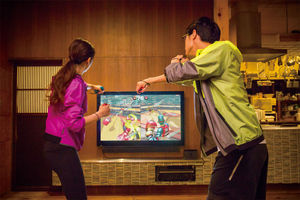
How to connect in TV mode
Source: www.nintendo.co.jp
TV Mode
What You Need
Nintendo Switch Dock
TV
HDMI cable
AC Adapter [HAC-002 (JPN)]
Source: www.nintendo.co.jp
How to connect
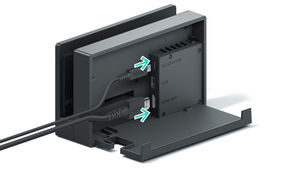
① Open the back cover of the Nintendo Switch dock.
② Connect the AC adapter to the top terminal and the HDMI cable to the bottom terminal.
Close the Nintendo Switch dock cover.
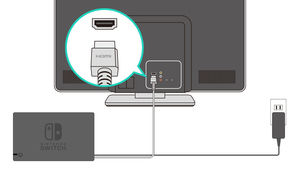
③ Connect the AC adapter to the outlet.
Source: www.nintendo.co.jp
④ Connect the HDMI cable to the TV.
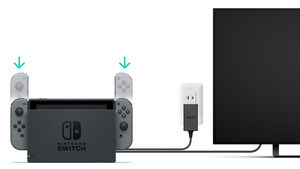
⑤ If the Joy-Con ™ is set to TV mode while it is attached to the body, the Joy-Con cannot be operated. Therefore, remove the left and right Joy-Con from the body.
Source: www.nintendo.co.jp
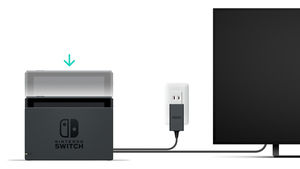
⑥ Insert the unit into the Nintendo Switch dock from the top so that it is in the center of the dock.
If you insert it to the back, the screen of the main body will disappear.
⑦ Turn on the TV and switch the input switch to HDMI. Check that the screen is displayed.
Play with the packaged software
Source: www.nintendo.co.jp
When you connect the included AC adapter to the main unit set, the main unit starts up.
Source: www.nintendo.co.jp
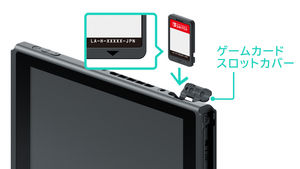
Open the game card slot cover on the console, and insert the game card into the slot. Make sure that the card is inserted in the correct direction. With the label facing you as shown in the figure, insert the card in the direction indicated by the ▼ mark until it clicks.
Source: www.nintendo.co.jp
Exit the software program
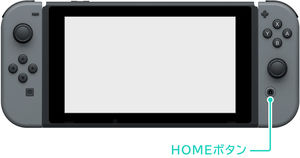
Press the HOME button to interrupt the software you are playing and display the HOME menu. With the interrupted software selected, press the X button to exit the software. If you need to save the software, save it before exiting the software. Unsaved data will be lost.
Source: www.nintendo.co.jp
To remove a game card
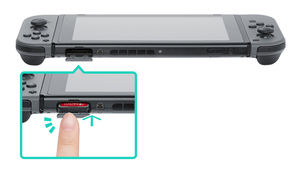
To remove the game card from the main unit, open the game card slot cover, push the game card into the slot, and then remove it.
After you take out the game card, keep it in the card case so that you don't lose it.
Exit the main unit
I recommend you to put it to sleep after playing.
Sleep reduces power consumption and allows you to quickly resume gaming.
Source: support.nintendo.co.jp
Put to sleep
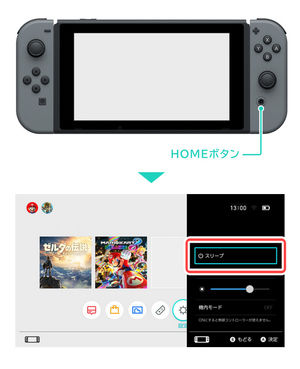
Press and hold the HOME button for 1 second or longer to display Quick Setting. Press "Sleep" to enter Sleep.
Press the HOME button to wake up and display the screen.
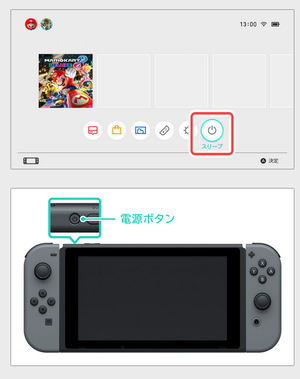
There are other ways to sleep / wake.
Go to sleep from the HOME menu
Select "Sleep" from the HOME menu to put the console to sleep.
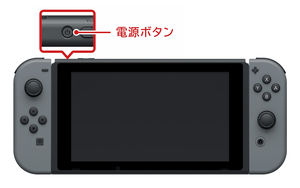
Sleep / wake with power button
Lightly press the power button to put the unit to sleep or wake it.
Source: support.nintendo.co.jp
How to turn off the power
1. Press and hold the power button for 3 seconds.
2. The Power menu will appear. Select "Power Options".
3. Select "Power off" to turn off the power completely.
* Save the software that needs to be saved before turning off the power of the main unit.
The unsaved data will be lost.
How to charge the battery
Source: www.nintendo.co.jp
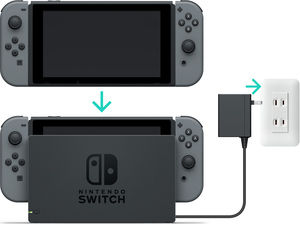
Plug into the Nintendo Switch dock
Plug the console into the Nintendo Switch dock with the AC adapter connected.
Source: www.nintendo.co.jp
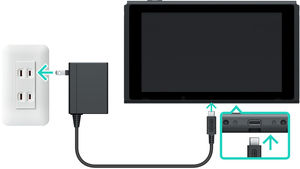
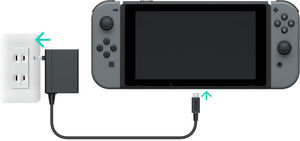
Connect the AC adapter directly to the unit.
Connect the AC adapter to the unit.
Source: www.nintendo.co.jp
Charging the Joy-Con
The Joy-Con can be charged in one of the following ways:
Attach to the charging unit
Attach to the Joy-Con charging grip

Contents
- What is the Nintendo Switch?
- Home game machine that can be taken out and played
- "Nintendo Switch Lite" for mobile phones will be released on September 20th (Fri), 2019!
- Great deal to buy Nintendo title download software!
- Be careful not to put the opposite direction, it will be difficult to remove it, so be careful!
- Main Unit Set Contents
- Nintendo Switch Online
- How to connect in TV mode
- Play with the packaged software
- Exit the main unit
- How to charge the battery
- How to check the battery level
- Internet connection
- Linking users and Nintendo accounts
- Friend
- Nintendo Mimamori Switch App for Parents
- Three ways of playing and controller settings
- TV Mode
- Table Mode
- Mobile mode
- Use the Joy-Con grip
- New left and right controller "Joy-Con"
- Joy-Con Key Features
- New tactile sense "HD vibration"
- Switch battery life
- Multi-Play up to 8 units
- Nintendo Switch Dock
- Now available is a colored Joy-Con. The "Joy-Con strap" is also available in different colors.
- Commercial for the Super Bowl, America's largest sporting event
- Nintendo Store opens on Monday, January 23
- * How to remove the Joy-Con strap when it is attached in the reverse direction.