

Here we have compiled a list of ways to download and save YouTube videos. No software is required, and the main method is to use a browser service or other method. You can save your favorite videos and watch them anytime.
[Good points of easy video download]
① Since there is no need to install software, there is no burden on the PC.
② In the case of YouTube videos, you only have to add "thx" to the URL, so you don't have to remember the URL of the site.
③ The list of YouTube videos is displayed in "Playlist" on the video easy download page, so it is very convenient when you want to download continuously.
④ Since there is a login input function, you may be able to download videos from sites that can only be downloaded by members.
[Improvements to Easy Video Download]
① It takes time to display the downloaded data.
② There are few choices of download formats depending on the video site.
③ Please increase the number of supported video sites
[3] y2mate. com
Download video and audio from YouTube
y2mate.com
Download video mp3 from youtube for PC, mobile, android and free ios. Support for downloading all video formats: mp4, mp3, 3 gp, webm, hd videos on youtube.
Currently the most downloadable site. It displays quickly. Details will be posted at a later date! (Please try downloading at your own risk)
[3-1] Good points and improvements of y2mate. com
[Good points of y2mate. com]
Anyway, the data display is fast!
② Even if other sites are unable to download, there is a high possibility of downloading.
[Improvements to y2mate. com]
(1) I want video sites other than youtube to be allowed.
② The advertisement display is a bit troublesome and the fake guidance is intense.
[4] dirpy
Dirpy Internet DVR
dirpy.com
Record, convert, clip and download your favorite streaming content for free!
This is an English site. What is good about "dirpy" is that you can edit the download file a little.
① You can specify the recording time with voice data.
② Saved data can be tagged
③ Can be converted to another video format
You can do these three things. I will explain how to use it from now!
[4-1] How to use dirpy
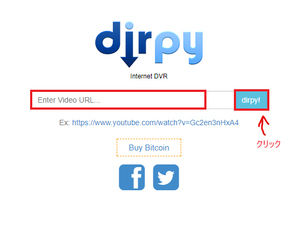
① Access the dirpy site
http://dirpy.com/
Access the above URL.
Copy and paste the video URL you want to download to the blank space and click the "dirpy!" button.
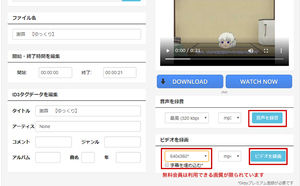
② Check the file name and save it!
Check the data you want to save. A movie appears in the upper right corner. If it is correct, enter the name of the file you want to save in "File name".
(Point! → It may not work well with a Japanese file name, so it is better to use an English file name)
After giving the file a name
"Record sound" to save the sound
Record Video if you want to save a movie
Click the button above. (Image Shown in Red Frame) However, if you are a free video download member, there is a limit to the image quality that you can download. You must select the image quality that a free member can download from the pull-down menu.
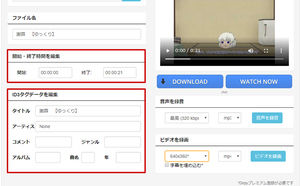
③ To specify the time of ID3 tag & voice data
The good thing about "dirpy" is that you can specify the time when you download audio data!
You can specify the number of minutes and the bit rate.
ID3 tags can d3 tags to audio and video data. Adding an ID3 tag is very useful when playing on other devices (such as iTunes).
Please use it before saving the data file in the above usage method ②.
[4-2] Good points and improvements of dirpy
[Good points of dirpy]
① An ID tag can be attached to the download file.
② You can specify the time and bit rate when downloading audio.
③ Less advertising than other sites
[Improvements to dirpy]
(1) Videos longer than 20 minutes cannot be downloaded (you need to become a dirpy premium member).
② The site itself is a bit heavy.
③ Free members have few choices in video quality
④ Official video (copyright video) cannot be downloaded
★ ★ If you are worried, register for "YouTube Premium (Paid)"! ★ ★
YouTube Premium - YouTube
www.youtube.com
YouTube Premium offers ad-free, offline, and background playback for YouTube and YouTube Music, as well as all YouTube Originals.
You can get a free trial for a month, and after that, you can enjoy the works of YouTube original series as well as play without advertisement, offline play, background play for 1,180 yen per month.
Because the YouTube download is temporary, you can enjoy offline playback for the duration of the download (approximately 30 days).
Unfortunately, you can save it temporarily from the YouTube app and mobile devices, but you can't save it on your computer.
Just a web browser! YouTube Download Easy Way - Media Basket
mediabaskets.jimdofree.com
Home Video / TV YouTube Download Radio Radiko Recording Win & Mac radiko Recording Android & iPhone Media Baskets Home Video / TV YouTube Download Radio Radiko Recording Win & Mac radiko Recording Android & iPhone Video / TV YouTube Download Article Updated: 2020.08.24 U …

Contents
- [Latest Version] No software required! Easy way to download YouTube
- Let's follow the rules!
- List of downloadable web services
- [1] Offliberty
- [1-1] How to use Offliberty
- [1-2] Good points and improvements in Offliberty
- [2] Easy Video Download
- [2-1] How to use Easy Video Download
- [2-2] Good points and improvements of easy video download
- [3] y2mate. com
- [3-1] Good points and improvements of y2mate. com
- [4] dirpy
- [4-1] How to use dirpy
- [4-2] Good points and improvements of dirpy
- ★ ★ If you are worried, register for "YouTube Premium (Paid)"! ★ ★