

Here we have compiled a list of ways to download and save YouTube videos. No software is required, and the main method is to use a browser service or other method. You can save your favorite videos and watch them anytime.
[Latest Version] No software required! Easy way to download YouTube
Here is a summary of the latest YouTube video storage methods. No need to install cumbersome software! I've put together a service where you can easily download videos for free if you have a web browser.
The method I introduced is only a service that can be easily downloaded only with a web browser, and basically when I tried it, I was able to download it safely, but please be careful when you download videos from the web service because you are responsible for downloading files.
Let's follow the rules!
STOP! illegal download
www.riaj.or.jp
From October 1, 2012, downloading music or video for sale knowing that it is uploaded illegally is subject to criminal penalties.
Please note that this summary does not recommend downloading illegally uploaded video and audio. Downloading illegally uploaded video and audio is subject to punishment. Follow the rules. Follow the links above and enjoy following the rules.
List of downloadable web services
[1] Offliberty
Offliberty - evidence of offline life
offliberty.com
Stay offline!
It's an English site.
Download not only YouTube videos but also videos from video sites other than YouTube!
Other than YouTube, Vimeo, Soundcloud, and Dailymotion were available for download. But there may be other video sharing sites that you can download.
[1-1] How to use Offliberty
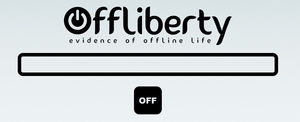
① Access the Offliberty site
http://offliberty.com/
Access the above URL.
Copy and paste the video URL you want to download to the blank space and click the "OFF" button.
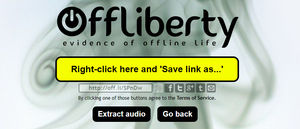
② If it is only a video file, it is OK to click the yellow button here.
If you only want the video file, press the yellow "Right-click ~" button (or right-click to save the link) to start the download in mp4 format.
If you want to download an audio file, press the black "Extract audio" button at the bottom.

③ In the case of sound files
After clicking the "Extract audio" button in ②, the download will start in mp3 format.
[1-2] Good points and improvements in Offliberty
Good point about Offliberty.
(1) The ability to download Vimeo, Soundcloud, Dailymotion, etc. other than YouTube.
(2) There are few strange advertisements, and you will not be led to another site.
Improvements of Offliberty
(1) YouTube lists cannot be downloaded.
(2) Official videos cannot be downloaded.
[2] Easy Video Download
https://www.thxyoutube.com/watch/
Easy Video Download is the version of that convenient "Thxyoutube" that came back!
In addition to YouTube, you can also download 9 tsu and Nico Nico Douga (*).
* How to download Niconico video is explained in [1-3].
If the video you want to download is a YouTube video, just add "thx" in front of the URL of the YouTube video you are currently watching!
If you use a browser on your mobile phone, you can download it.
To download a video, just press the download button! You can also download audio only.
[2-1] How to use Easy Video Download
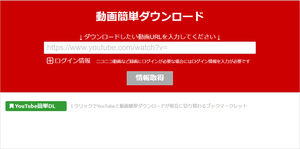
① Access the easy video download!
https://www.thxyoutube.com/watch/
Access the above URL.
Paste the video URL you want to download and click the "Get Info" button.
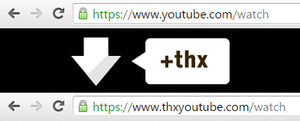
② For YouTube videos, just add "thx" to the YouTube video URL!
In the case of YouTube videos, you can access the easy video download page by adding "thx" before YouTube in the YouTube video URL.
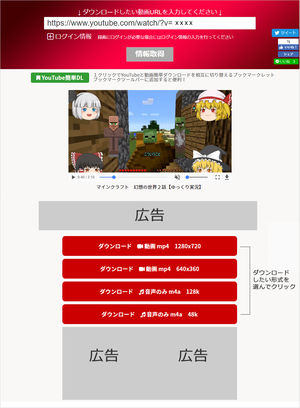
Select the download format.
When loading is completed while obtaining video information, a button to select the download format appears.
Select the download format required for the application, such as video or audio only.
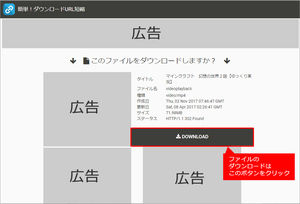
Download the file
A separate window (or tab) will open and a download button will appear along with information on the download format selected in step (3). The download button is in the red frame.
Click the button (or right-click to save the link) to start downloading.
The downloaded video will be placed in the "Download" folder.
The file name is displayed at the top of the page. (In this case, the file will be downloaded under the name "videoplayback.")
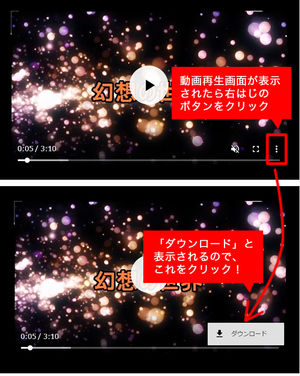
⑤ When the playback screen appears and it is not downloaded (mainly Chrome browser)
You may not be able to download the file in ④, and only the playback screen may be displayed in another tab.
"Offliberty" (see below) is a similar phenomenon that occurs in Chromium-based browsers.
In this case, if you click "●●●」(vertical display" at the right edge of the playback screen, "Download" will be displayed, so click it to start downloading.
[2-2] Good points and improvements of easy video download

Contents
- [Latest Version] No software required! Easy way to download YouTube
- Let's follow the rules!
- List of downloadable web services
- [1] Offliberty
- [1-1] How to use Offliberty
- [1-2] Good points and improvements in Offliberty
- [2] Easy Video Download
- [2-1] How to use Easy Video Download
- [2-2] Good points and improvements of easy video download
- [3] y2mate. com
- [3-1] Good points and improvements of y2mate. com
- [4] dirpy
- [4-1] How to use dirpy
- [4-2] Good points and improvements of dirpy
- ★ ★ If you are worried, register for "YouTube Premium (Paid)"! ★ ★