

Here we summarize how to record "time free" programs on radiko, a service that allows you to listen to radio programs. Time Free is a feature that allows you to listen to radio programs broadcast within the past week at any time you like, and we have introduced methods for different devices, such as PCs and smartphones.
2. "RadikoPad"
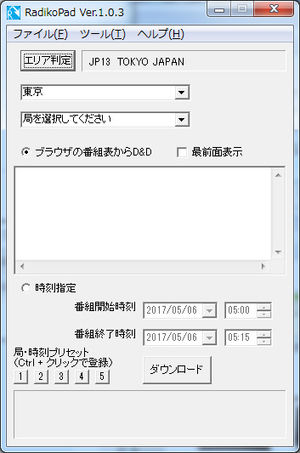
[Available Devices] Windows PC
[Supported OS] Windows XP / Vista / 7 / 8. x / 10
[Usage fee] Free
RadikoPad: Radiko Recording Timefree Windows Tools - System Administration Notes
www.lifewithunix.jp
To get started, all you need to do is launch RadikoPad, use your Web browser to view a list of Radioco Time Free shows, drag and drop the show you want to save to RadikoPad, and hit the "Download" button.
For details on how to install and how to use it, please refer to the RadikoPad page above.
This "RadikoPad" is very easy to operate because all you have to do is drag and drop the program you want to record from the program list of radiko. jp to "RadikoPad".
Drag-and-drop is great! ♪
In addition to using the program guide, you can also save programs by specifying the broadcasting station, save start date and time, and save end date and time from the "Select time" menu.
This is also a way to download time-free program files, so getting them is very fast!
You can select ". aac" or ". m4a" as the save file format.
3) "Rajroku 11"
Radicut 11 for Windows: Record the time free of radiko. jp at ultra-high speed! YouTube video audio can also be recorded at high-speed!:: Magnolia
www.magnolia.co.jp
Radio recording software for PCs that can record Internet radio broadcasting "radiko. jp" (radiko), NHK net radio "Radiru ★ Radiru", and community radio. It supports the recording of radiko's "Time Free Broadcasting" and paid plan "Area Free", and local stations of Radiru ★ Radiru!
Available Devices Windows PC, Mac
Supported OS
Windows Vista / 7 / 8.x / 10
MacOS X 10.8 or later with MacOS Sierra support
[Usage fee] Charged
[3-1] How to record time-free programs with "Rajroku 11"
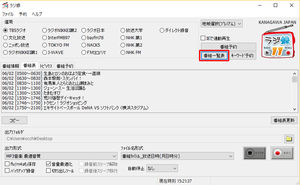
① Start the radio record and display the program list.
Install "Rajroku 11". Click the "Rajroku" icon on the desktop to start it.
There is a button called "List of Programs" on the right side, so click it to display the list of radio programs.
* If you want to use the area free service, please set up the premium account of Radico in advance.
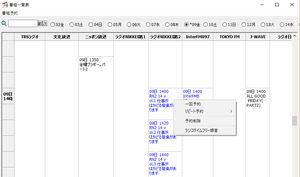
② Search for the program you want to record time-free from the program list.
The current time and programs after the current time are displayed with black program names, and programs before the current time (past) are displayed with blue program names.
Since the program you want to record time-free is in the past, you can right-click on the blue frame and a menu will appear where you can choose Radico Time-Free Recording.
* For right-click selection, it is important to select the program frame!
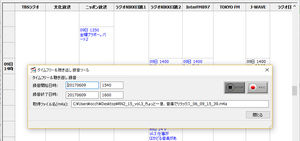
③ Start recording from Time Free & Missed Recording Tool
When time-free recording is selected in ②, a window called "Time-free and missed recording tool" is displayed.
Confirm (or change) the start time and end time, the recording file generation destination, and the recording file name, and then click the recording button marked with a red circle.
These are the results of testing "Radicut 11".
The one I tried this time is for Windows, so all the images are for Windows.
There was the latest update to "Rajroku 11", so I updated it and I was able to record the missed listening service of NHK Rajiru ★ Rajiru as well as "Raguiko"!
Since the operation is not intuitive, it didn't go smoothly at first, but once you get used to it, it will be fine. Since it has Windows and Mac versions and support, it is good for those who are a bit worried about free software.
[For Mac PC]
1) "Rajinko Mac version"
Raguiko for Mac: radiko. jp Record time-free recordings at high speed (free)
dogaradi.123net.jp

[Available Devices] Mac
[recommended environment] macOS 10.13 High Sierra or later
[Corresponding radio service] radiko. jp, Rajiru ★ Rajiru (Missed, including NHK ゴガク)
[Usage fee] Free
The official release was released in May 2020! Available radio services include radiko. jp Torajiru Rajiru. Rajiru Rajiru is a missed call service and ゴガク.
The following features are available:
Listening and recording, time-free playback and time-free recording of the currently broadcast program of ◇ ◇ radiko. jp.
You can listen to and record the air, play and record missed calls, and play and record NHK ゴガク.
* Reserved recording is not available at this time.
Mac users are looking forward to more features in the future.
2) "Radicut 11 Mac version"
Rajroku 11 for Mac: Record the time free of radiko. jp at ultra-high speed! Record the audio of YouTube videos at high-speed!:: Magnolia
www.magnolia.co.jp
Radio recording software for PCs that can record Internet radio broadcasting "radiko. jp" (radiko), NHK net radio "Radiru ★ Radiru", and community radio. It supports the recording of radiko's "Time Free Broadcasting" and paid plan "Area Free", and local stations of Radiru ★ Radiru!
[Available Devices] Mac
Recommended MacOS X 10.8 or later with MacOS Sierra
[Supported Radio Services] radiko. jp, Raju ★ Raju (including Missed Call Service)
[Usage fee] Charged
3) "Net Radio Recording X Mac Version"
Windows / Mac Radio Recording and Playback Net Radio Recording X Official Site
netradio-rokuon.com
Net Radio Recording X is software for playing and recording Internet radio (radiko. jp / Radio ★ Radio) that is compatible with Windows and macOS (Catalina compatible). You can easily record and play the radio with simple operation. It also has many useful functions such as automatic acquisition of artwork and meta tags of program information.
[Available Devices] Mac
Recommended Environment macOS 10.12 (Sierra) or later
[Corresponding radio service] radiko. jp, Rajiru ★ Rajiru (including missed listening), NHK ゴガク
[Usage fee] Charged
For more information on how to use it, I made a summary for Mac, so please see here.
[For Android smartphones]

Contents
- What is radiko's time-free?
- How do I record a timefree show
- [For WindowsPC]
- 1) "Rajinko"
- [1-1] How to record time-free programs with "Rakitiko"
- [1-2] Time-free programs can be pre-recorded
- 2. "RadikoPad"
- 3) "Rajroku 11"
- [3-1] How to record time-free programs with "Rajroku 11"
- [For Mac PC]
- 1) "Rajinko Mac version"
- 2) "Radicut 11 Mac version"
- 3) "Net Radio Recording X Mac Version"
- [For Android smartphones]
- 1. "Rakuraji"
- 2. "Raj Cutter"
- [For iPhone]
- 1. "Rakuraji"
- [Other methods]
- 1. Record the time-free playback sound using the recording function of the software.
- 2. Record the playback sound using the recording function of the PC.